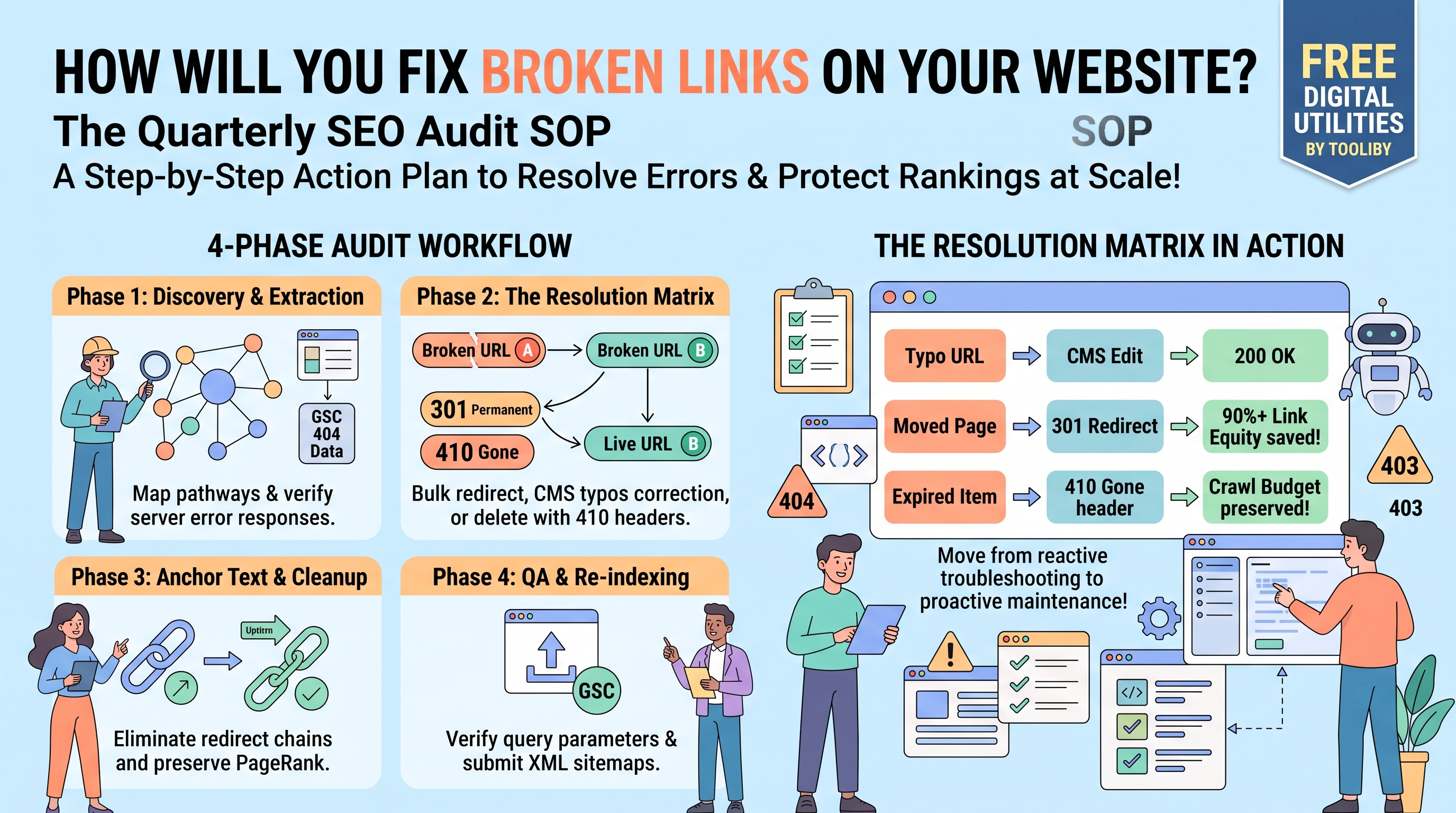
How Will You Fix Broken Links on Your Website? (The Quarterly SEO Audit SOP)
While beginner webmasters often deal with broken links on a case-by-case basis—fixing a typo here or setting up a 301 redirect there—scaling this process for a growing website requires a vastly different approach. When you manage a 500-page e-commerce store or run an SEO agency responsible for enterprise clients, reacting to 404 errors is no longer sufficient. You need a proactive, systematic strategy.
When a client or a project manager asks, "How will you fix broken links on your website without disrupting our current traffic?", your answer must go beyond basic troubleshooting. You need a structured Standard Operating Procedure (SOP).
In this advanced, agency-level guide, we will outline the exact Quarterly SEO Audit SOP used by technical SEO professionals. We will cover how to check a site for broken links at scale, how to categorize HTTP errors for rapid resolution, and how to execute bulk fixes flawlessly using the suite of free digital utilities at Tooliby.
[Insert Banner Image Here]
Table of Contents
The Agency SOP Overview: Moving from Reactive to Proactive
A standard link auditing SOP should be executed every 90 days (quarterly) for informational blogs, and every 30 days for dynamic e-commerce websites.
The goal of this SOP is not just to answer how to check a site for broken links, but to ensure zero link equity is lost during structural migrations, product deletions, or content pruning.
The Quarterly Link Audit SOP is divided into four distinct phases:
Discovery: Extracting the current site architecture and logging all URL endpoints.
Resolution: Applying the correct server directives (301, 302, 410) to broken pathways.
Cleanup: Re-aligning internal link profiles and anchor texts.
Verification: Validating the fixes and updating search engine maps.
Let’s break down each phase step-by-step.
Phase 1: Discovery & Extraction (How to Check a Site)
Before you can fix anything, you must conduct a comprehensive crawl of the domain to identify every active, broken, and redirected hyperlink.
Step 1.1: Map the Internal Architecture
Start by mapping out every internal connection on the domain. For massive sites, doing this manually is impossible.
Use the
Internal Links Finder to extract every hyperlinked pathway across your primary hub pages.Cross-reference the density and volume of these links using the
Internal Link Count tool. This helps you identify which high-priority "money pages" might be suffering from broken inbound connections.
Step 1.2: Perform HTTP Status Triage
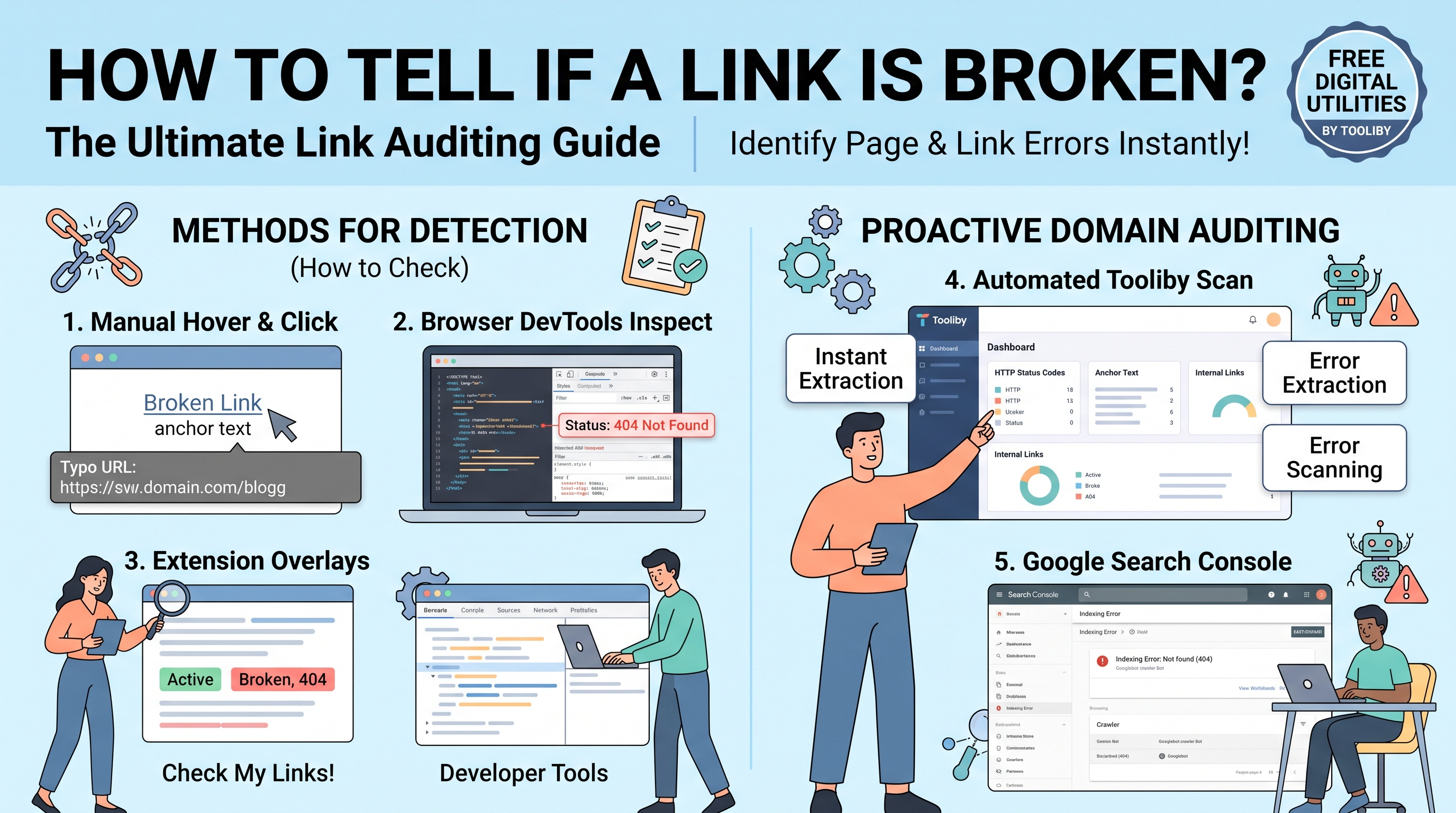
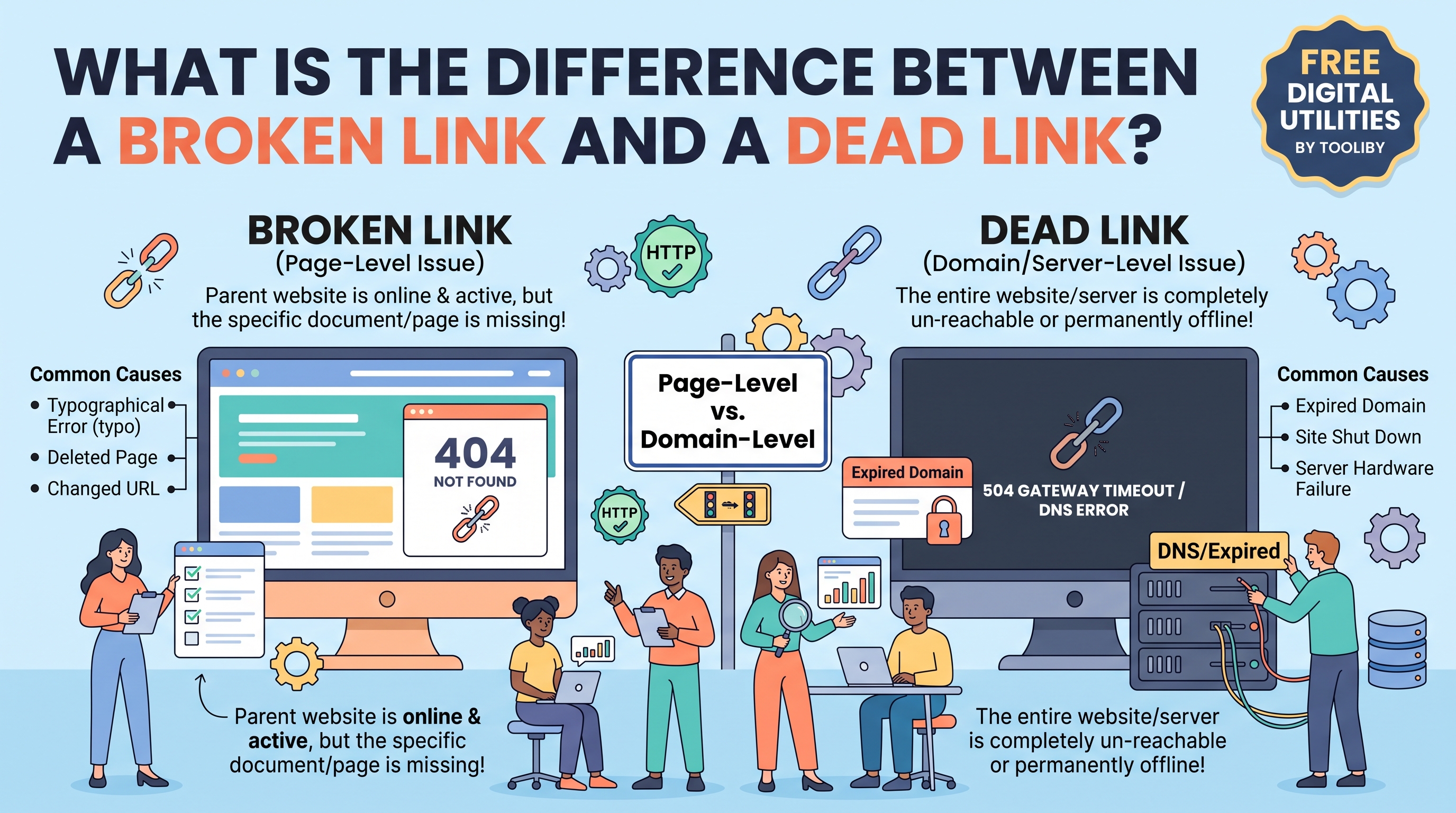
Once you have your master list of URLs, you must determine how the server is responding to them. You are looking for URLs returning 404 Not Found, 403 Forbidden, or 500 Server Error.
Run your suspected broken URLs through the
HTTP Lookup Tool to verify their exact server response in real-time.If you or your team are unfamiliar with a specific error code that appears during the crawl, reference the
HTTP Status Codes dictionary to understand the technical severity of the issue.
Step 1.3: Export Google Search Console Data
Always combine your manual tool extraction with Google’s own data. Log into Google Search Console, navigate to Indexing > Pages, and export the list of URLs flagged under the "Not found (404)" error report. Merge this with your Tooliby data to create your Master Resolution Spreadsheet.
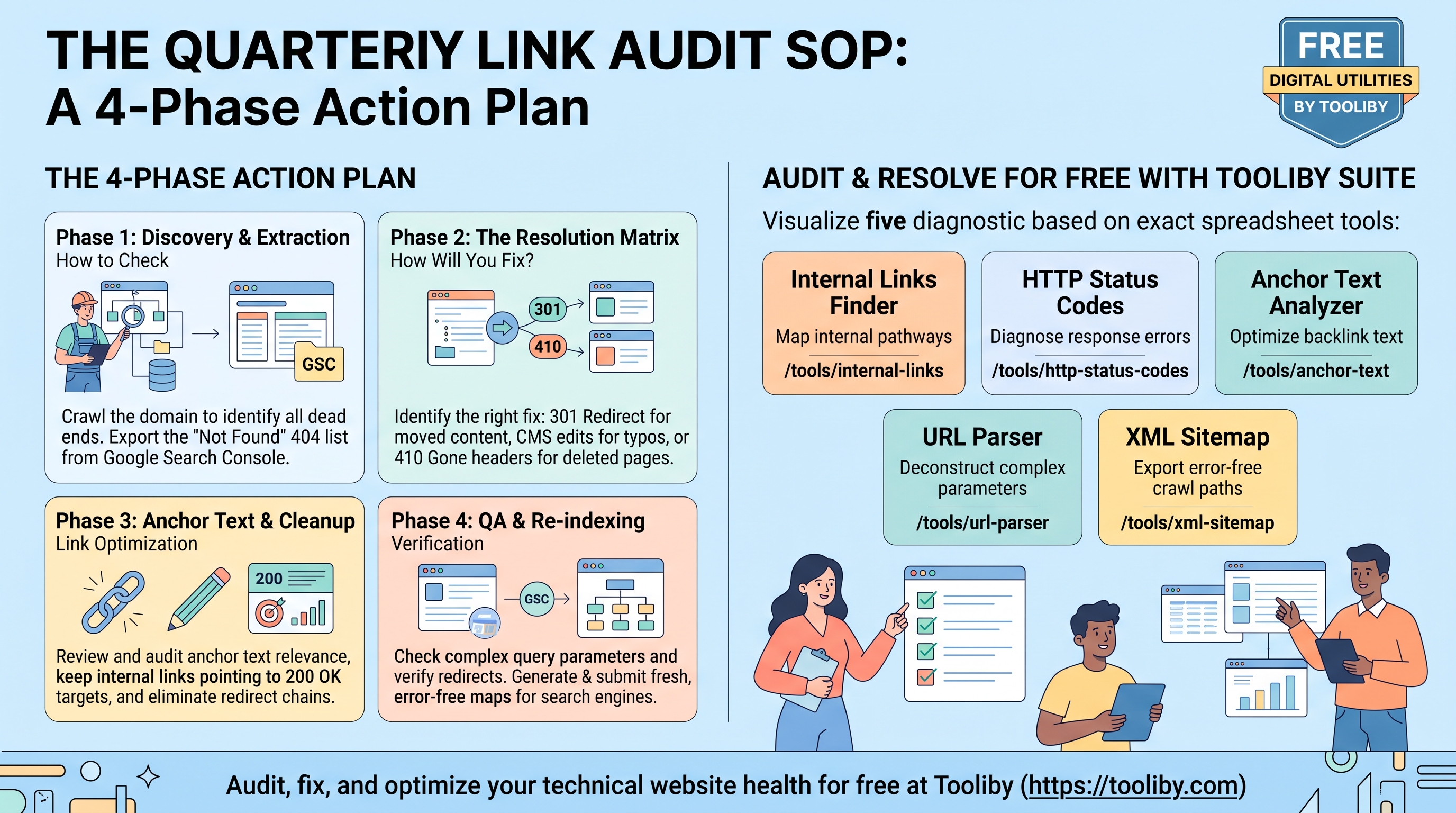
Phase 2: The Resolution Matrix (How Will You Fix the Links?)
Now that you have your Master Resolution Spreadsheet, the client's core question arises: How will you fix broken links on your website?
In an agency setting, we do not blindly redirect everything to the homepage (which creates dangerous "Soft 404" errors). Instead, we apply a strict Resolution Matrix.
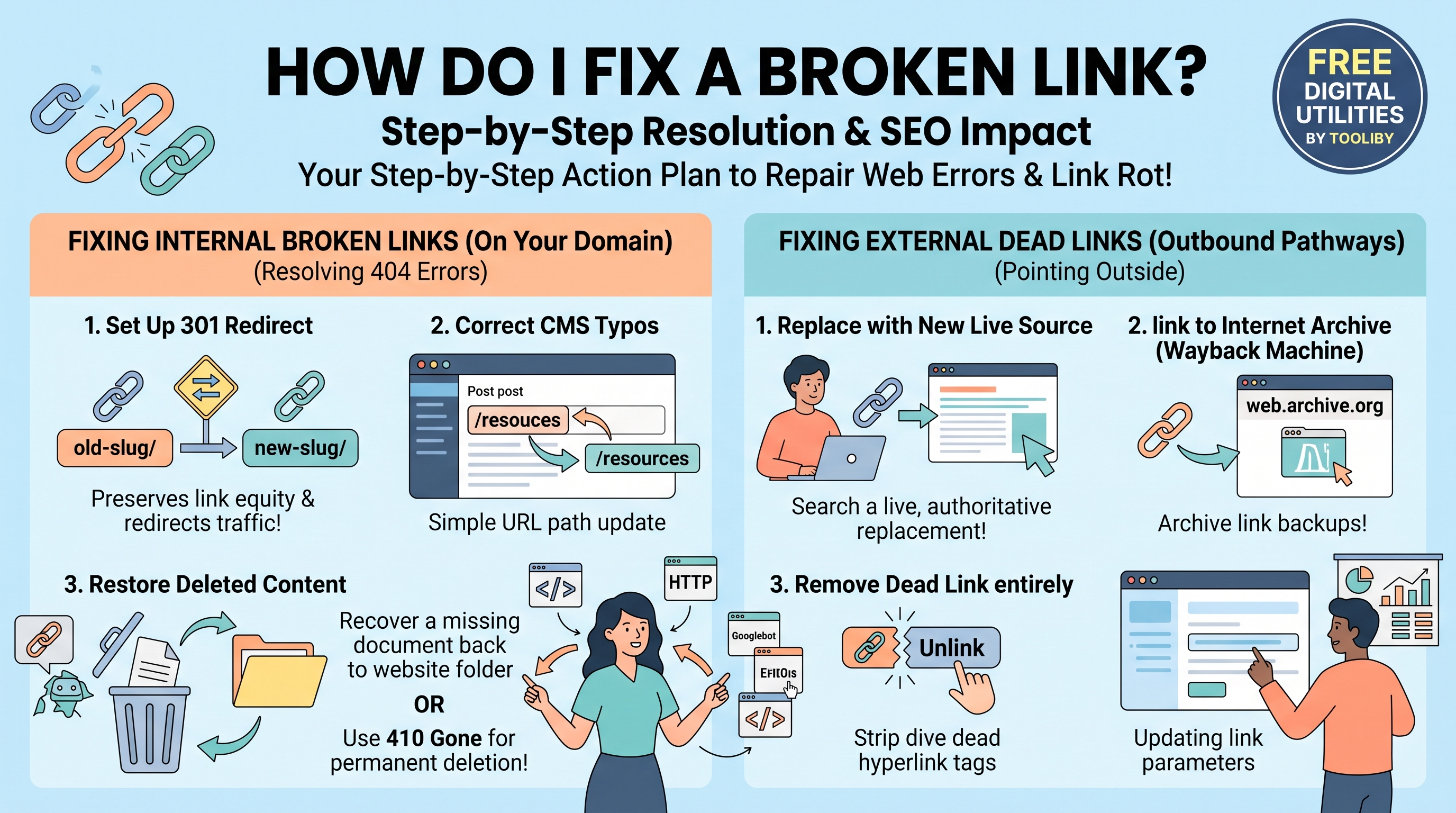
Action A: The 301 Permanent Redirect (For Moved Content)
If a broken URL was generated because a page was renamed, merged into a larger guide, or moved to a new category folder, you must implement a 301 redirect.
The SOP Execution: Map the broken URL (URL A) to its highly relevant live counterpart (URL B). Update your server's
.htaccessfile or Nginx config to forcefully route users and search bots to the new destination. This preserves 90-99% of the original PageRank.
Action B: The 410 Gone Directive (For Permanently Deleted Content)
E-commerce sites frequently discontinue seasonal products. If a product is gone forever and there is no equivalent substitute, do not use a 301 redirect.
The SOP Execution: Apply a
410 GoneHTTP header to the URL. This explicitly tells Googlebot that the page was deleted intentionally and will never return, prompting the search engine to de-index the page rapidly and stop wasting your crawl budget.
Action C: The CMS Hard Edit (For Typos)
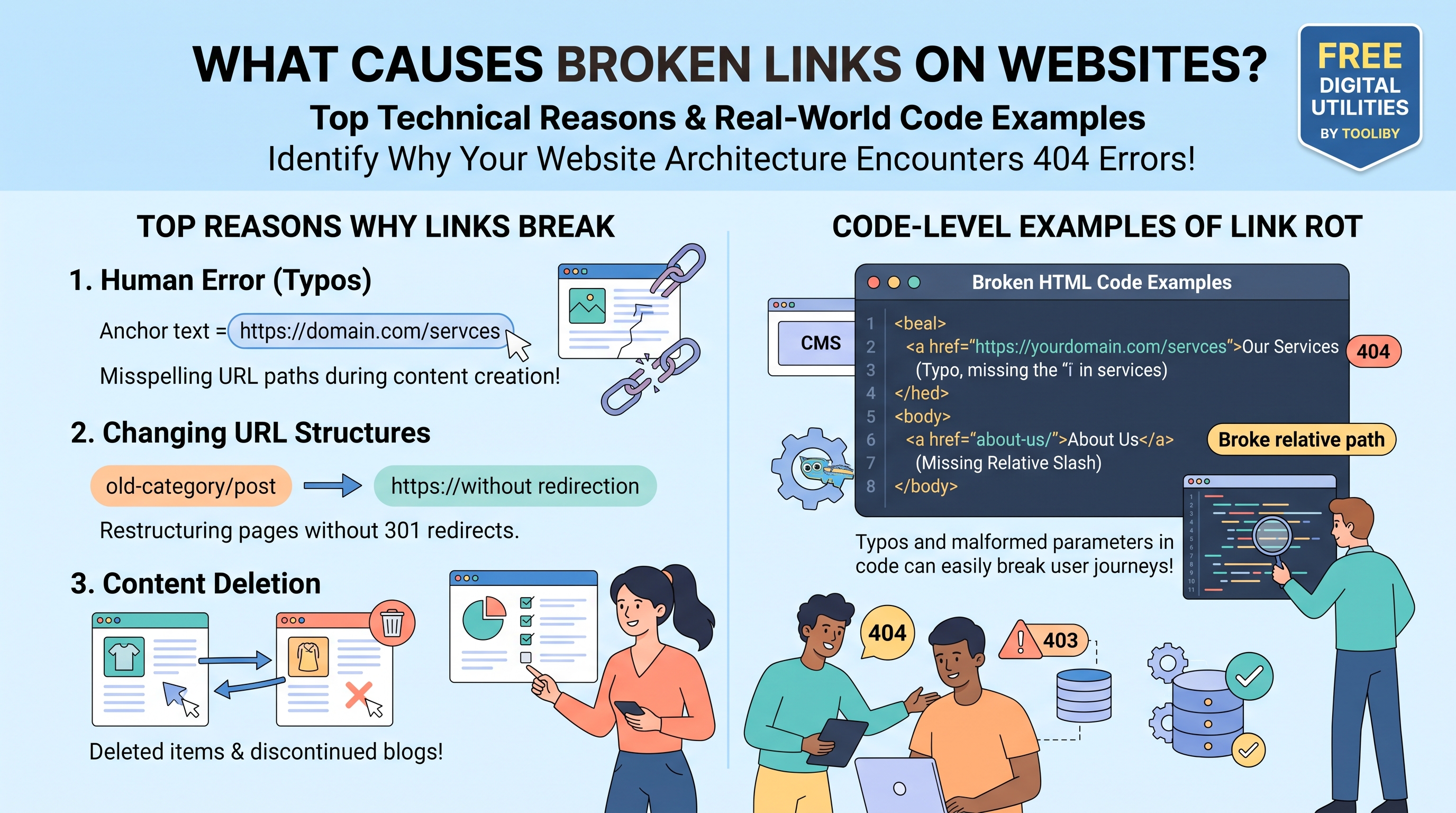
If the page is live but the link is breaking due to human error (e.g., misspelled URL slugs in the text), server directives are unnecessary.
The SOP Execution: Assign the content team to log into the CMS, locate the specific posts containing the malformed links, and manually update the HTML anchor tags to reflect the correct spelling.
Phase 3: Anchor Text Optimization & Cleanup
Fixing the server response is only half the battle. A truly optimized website requires a pristine internal linking structure. If you have redirected 50 broken URLs to new destinations, your site is now relying on redirect chains, which slow down page speed and dilute link equity.
Step 3.1: Audit the Anchor Text Profile
You must ensure that the text used to link to your new URLs remains contextually relevant.
Run your updated pages through the
Anchor Text Analyzer .Verify that the anchor text isn't over-optimized (keyword stuffing) and accurately reflects the topic of the new, redirected destination page.
Step 3.2: Eliminate Redirect Chains
If a user clicks a link that hits a 301 redirect, they are taken to the right place. However, the best practice is to update the original hyperlink itself so it points directly to the final destination, bypassing the redirect entirely. Edit your CMS to ensure all internal links point to 200 OK final destination URLs.
Phase 4: QA Verification and Re-Indexing
The final phase of the quarterly SOP ensures that your fixes have been properly implemented and communicated to search engines.
Step 4.1: Inspect Query Strings and Parameters
Sometimes, fixing a broken link involves dealing with complex UTM parameters or faceted navigation strings.
Use the
URL Parser to safely deconstruct complex URLs. Ensure that your fixes haven't accidentally broken query strings that your marketing team relies on for analytics tracking.
Step 4.2: Regenerate and Submit the XML Sitemap
If you have deleted URLs (410) or created new pathways, your old sitemap is now technically obsolete and misleading to search engines.
Generate a pristine, freshly updated map of your site architecture using the
XML Sitemap Generator .Log into Google Search Console and Bing Webmaster Tools to submit the new XML sitemap. This forces crawlers to re-evaluate your site, discover the resolved links, and restore your organic rankings.
Execute Your Audits with Tooliby Utilities
An advanced SEO SOP is only as effective as the tools used to execute it. Agencies and webmasters waste thousands of dollars on bloated SEO software when the exact same technical audits can be conducted for free.
By bookmarking
Make link rot a thing of the past by implementing this Quarterly SOP today.
Frequently Asked Questions (FAQs)
1. How will you fix broken links on your website at scale?
At scale, broken links are fixed by executing a structured SOP: extracting all URLs via a crawler, categorizing the errors, applying bulk 301 redirects via server configuration for moved content, issuing 410 headers for deleted content, and manually correcting typos in the CMS.
2. How to check a site for broken links thoroughly?
To thoroughly check a site, combine manual crawler extractions using tools like Tooliby's Internal Links Finder with backend crawl data exported directly from Google Search Console’s "Not found (404)" indexing report.
3. Why shouldn't I redirect all broken links to my homepage?
Redirecting a specific, broken topical page (e.g., "Men's Leather Jackets") to a generic homepage creates a "Soft 404." Google recognizes that the user's search intent was not met and will ignore the redirect, causing you to lose the link equity anyway.
4. How often should an agency perform a link audit?
For massive e-commerce sites or dynamic news publishers, a link audit should be performed monthly. For standard B2B websites, service businesses, and informational blogs, a comprehensive quarterly audit (every 90 days) is sufficient.
5. What is the difference between a 301 redirect and updating an internal link?
A 301 redirect is a server-level command that catches users trying to visit an old, broken URL and forwards them to a new one. Updating an internal link involves editing your website's HTML so that users click the correct URL directly, completely bypassing the need for server forwarding.
What Is Tooliby Blog?
Tooliby Blog is a free publication covering developer tools, SEO, AI prompts and productivity — written by real practitioners who use these tools daily. No paywall, no account needed. Just practical content you can act on.
Can I share this article?
Yes — use the share buttons above to post on Twitter, LinkedIn, Facebook or WhatsApp. The more people read it, the better.
How do I write for Tooliby?
Click Write for Us and submit your article. We review within 48 hours and publish with full author credit and bio.